Entra ID Tip: Who's Behind That Tenant GUID?
You open the Azure portal, follow a subscription link, and reach a directory you do not recognize. The account looks right. The destination does not.
The address bar gives you a clue:
https://login.microsoftonline.com/<tenant-guid>/oauth2/v2.0/authorizeThat GUID identifies the directory handling authentication. It does not tell you much about the organization behind it.
You could ask an administrator to identify it, if you knew which administrator to ask. You could try signing in, except the unexpected directory might be the reason authentication is failing.
There is a more direct way. Microsoft Graph can return a tenant’s display name and default domain without requiring you to sign into that tenant.
The tip
Authenticate with a workforce account in a directory you can access. Then call:
GET https://graph.microsoft.com/v1.0/tenantRelationships/findTenantInformationByTenantId(tenantId='{target-guid}')The required Graph permission is:
CrossTenantInformation.ReadBasic.AllThe response contains basic tenant information. For example:
{
  "tenantId": "11111111-2222-3333-4444-555555555555",
  "displayName": "Contoso",
  "defaultDomainName": "contoso.com"
}
This is an illustrative response, not information from a real lookup.
The useful distinction is that you authenticate in one tenant and identify another. The operation does not require membership in the target directory.
What happens behind the call
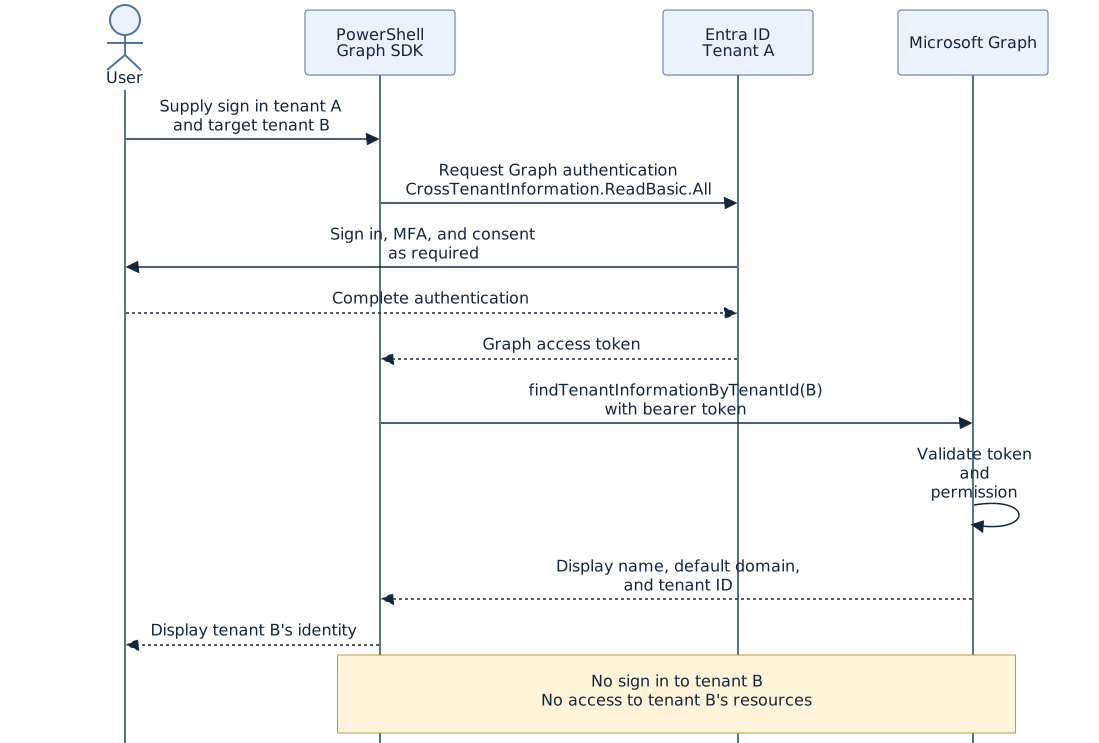
The Graph SDK requests an access token through your chosen workforce tenant. Microsoft Graph checks the token and the permission before returning the requested metadata.
The target GUID is a function argument. It does not switch your authenticated session into the target tenant.
For this operation, Microsoft documents that the calling user does not need an Entra directory role. That does not remove the application’s permission and consent requirements. Administrator approval may be needed.
Personal Microsoft accounts are not supported for the delegated lookup. Use a work or school account.
Try it in PowerShell
Install the authentication module if it is not already available:
Install-Module Microsoft.Graph.Authentication -Scope CurrentUserReplace the placeholders below with actual tenant GUIDs:
$ErrorActionPreference = 'Stop'

$SignInTenantId = [guid]'<your-workforce-tenant-guid>'
$TargetTenantId = [guid]'<target-tenant-guid>'

Connect-MgGraph `
    -TenantId $SignInTenantId.ToString() `
    -Scopes 'CrossTenantInformation.ReadBasic.All' `
    -ContextScope Process `
    -NoWelcome

try {
    $Uri = 'https://graph.microsoft.com/v1.0/tenantRelationships/' +
        "findTenantInformationByTenantId(tenantId='$TargetTenantId')"

    $Info = Invoke-MgGraphRequest -Method GET -Uri $Uri

    [PSCustomObject]@{
        TenantId      = $Info.tenantId
        DisplayName   = $Info.displayName
        DefaultDomain = $Info.defaultDomainName
    } | Format-List
}
finally {
    Disconnect-MgGraph | Out-Null
}
The SDK handles the token. You do not need to extract it or paste it into a request manually.
-ContextScope Process limits authentication context persistence to the current process. The finally block disconnects the Graph session after the lookup.
What the answer does not tell you
A default domain is not a domain inventory. The result might be a custom domain such as contoso.com, rather than the original .onmicrosoft.com domain.
To list verified domains, you need a different operation:
GET https://graph.microsoft.com/v1.0/domainsReading that inventory for the target tenant requires appropriate authorization in that tenant, typically Domain.Read.All. The cross tenant lookup permission does not provide it.
The display name also does not identify the current administrator, establish legal ownership, or prove that your account can access the tenant’s subscriptions.
Use the response to identify the directory. Do not read more into it than the API returns.
Two traps worth avoiding
A GUID does not tell you its object type
Tenant IDs and subscription IDs have the same format. A Visual Studio subscription ID is not an Entra tenant ID, even though both pass a GUID format check.
Confirm what the identifier represents before interpreting a failed lookup.
OpenID discovery is not a reverse domain lookup
The public discovery endpoint is:
https://login.microsoftonline.com/{tenant-id}/v2.0/.well-known/openid-configurationIt publishes authentication metadata, including authorization endpoints and signing key locations.
When you query it with a tenant GUID, its authorization URL typically contains that same GUID. Extracting the tenant segment gives you back the identifier you already supplied. It does not reveal the directory’s domain.
Is this a security issue?
The API exposes metadata intentionally. Microsoft documents it as a way to validate tenant information when configuring cross tenant access settings.
That does not make the information irrelevant to security. A recognizable organization name and domain can help an attacker connect an otherwise opaque GUID to an organization. Those details can also supply context for phishing.
The boundary is what the lookup authorizes. It permits basic identification. It does not permit reading the target’s users, modifying applications, accessing subscriptions, or bypassing MFA.
Tenant IDs and display names should therefore be treated as discoverable identifiers, not secrets that protect access. Equally, a familiar name in the response is not evidence that a directory should be trusted.
Discovery is not authorization, and recognition is not verification.
Back to the unexpected redirect
You now have something more useful than an anonymous GUID. You can compare the directory with the expected tenant, ask the resource owner to confirm the association, or add the resolved name and domain to a support ticket.
The lookup will not repair a tenant association or solve an MFA failure. It answers the question that comes before those investigations:
Which directory am I actually being sent to?
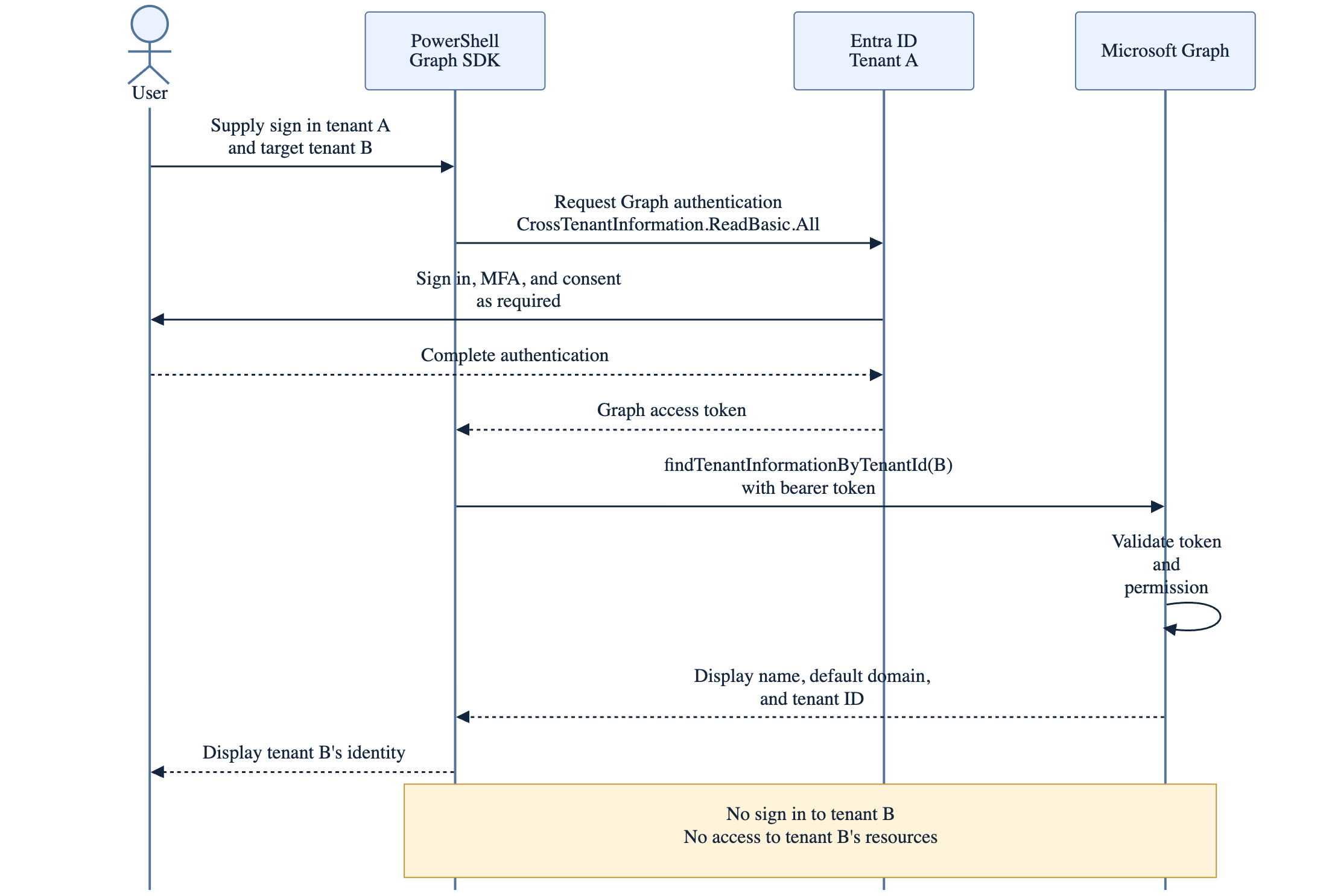
References and diagram source
Read next
- Attack
Anatomy of a Cyberattack: Bot Attack Patterns and Server-Side Defenses
A technical look at automated web abuse, credential stuffing and Turnstile's server-side verification, with three diagrams and practical production controls.
- Digital Identity
Presenting Entra Agent ID at the EMEA AI Bootcamp
Notes from presenting on Microsoft Entra Agent ID at the virtual EMEA readiness bootcamp on the Entra Suite, for attendees across the Gulf, Europe, and Africa.
- Digital Identity
Using Client Certificate Authentication for Web API Hosted in Azure
During recent customer engagement there was a discussion around client certificate [a.k.a tls mutual] authentication and how to use it with asp.net web api that is hosted on azure as a azure api app.
Worth reading again?
Get the next one in your inbox.