Entra Agent ID Across Clouds: Part 1, Lower Environment and Secrets
About this series. Five articles on running Microsoft Entra Agent ID against third-party clouds. Each one focuses on one layer of the trust story so you can read whichever part you actually need.
- Entra Agent ID Across Clouds: Part 1, Lower Environment and Secrets (this article)
- Entra Agent ID Across Clouds: Part 2, Federation End to End
- Entra Agent ID Across Clouds: Part 3, Managed Identity and Entra Objects
- Entra Agent ID Across Clouds: Part 4, FIC, Cross-Tenant, and OBO
- Entra Agent ID Across Clouds: Part 5, Anti-Patterns
What this article covers
An agent using Entra Agent ID that calls a third-party cloud has to authenticate to two trust roots on every request. It calls your own APIs, so Microsoft Entra ID has to issue it a token. It calls a model hosted on AWS or GCP, so that cloud has to accept it as a workload too. Two different issuers, two different verifications, one agent process in the middle.
How those two tokens are obtained is the architectural decision behind every deployment in this series. The production answer is federation: nothing long-lived on disk, no client secrets handed to a container or a CI runner, and every credential minted on demand from something the runtime already proves. Parts 2 through 5 cover the federated shape end to end, including the Azure pieces (managed identity, federated identity credentials) and the cloud-side pieces (AWS STS, GCP Workload Identity Federation).
Federation has a prerequisite, though. It only works when the agent runs on attested compute, infrastructure the cloud can vouch for cryptographically. A laptop, a CI runner, and a shared dev box are none of those things. That gap is why this series treats deployment targets as two distinct environments rather than one.
- A lower environment is your laptop, a CI runner, or any host that is not attested compute inside Azure.
- A higher environment is Azure compute that can present a managed-identity token.
The trust roots available in each are different, so the architectures are different. This first article describes the model and walks the secret-based pattern, which is what you use in the lower environment. By the end you will be able to trace the request flow on a laptop, identify each JWT in flight, and recognize the four failure modes that catch most people on the first attempt. The federated shape, and the reasons it matters for everything beyond inner-loop development, is the subject of Part 2.
Note. Two environments, one architecture
The agent code, the sidecar boundary, the Entra SDK, the downstream API contract, the ReAct loop, and the telemetry path are byte-for-byte identical between the lower environment and the higher environment. Only the moment when the first Entra token is born changes. The entire body of this series is an unpacking of that one sentence.
The two-pillar model: lower environment versus higher environment
Everything in the series fits inside one of two pillars.
| Pillar | What it is | The pattern it runs | What sits on disk | When you use it |
|---|---|---|---|---|
| Lower environment | A laptop, a CI runner, a shared dev box, a demo machine. Anything that is not attested compute inside Azure. | Secret-based | Cloud-provider credential (key file or access key) and Blueprint client secret | Inner loop, samples, demos, integration tests |
| Higher environment | Azure Container Apps, AKS, VMs, App Service, or any Azure compute that exposes a managed-identity token endpoint. | Federated | Nothing | Staging, pre-production, production |
The pillars are not a quality ranking. They are two architectures that solve the same problem with different trust roots, because the trust roots that are available in each pillar are genuinely different.
Note on naming. This series uses secret-based and federated to describe the two trust architectures. The names map directly onto industry vocabulary: Microsoft Learn, AWS IAM, and GCP IAM all use secret / credential on one side and federated / federation on the other. The two shapes here are: one rooted in disk credentials (lower environment), one rooted in cloud-attested compute (higher environment). Two intermediate variants (the user-rooted bootstrap variant and the Blueprint-secret cloud-federation variant) are anti-patterns in their own right and live in Part 5.
What changes on the wire between environments
The single most useful diagram to keep in your head is the one for arrow (1), the call from your agent to the third-party-cloud LLM. Both the secret-based and federated patterns put the same kind of authorization on the wire: the cloud’s own bearer token or signed-request envelope. What changes is where the trust comes from.
| Secret-based | Federated | |
|---|---|---|
| Authorization on the wire to the cloud LLM | Cloud-native (cloud-issued bearer token, or a SigV4-signed request) | Cloud-native (same shape as secret-based, with shorter-lived material underneath) |
| Root of trust on host | Long-lived cloud credential on disk (a JSON key file, an access-key pair, or equivalent) | OIDC trust contract the cloud holds with Entra |
| What the cloud verified before issuing the credential | ”This caller possesses the long-lived secret bound to this cloud principal" | "An Entra-signed assertion arrived whose sub matches our trust gate” |
| Blast radius if the host is compromised | Attacker exfiltrates the credential file and impersonates the cloud principal from anywhere until you rotate | Attacker can only act while inside the trusted runtime, and only for the token’s short lifetime |
Caution. Both patterns produce identical-looking cloud calls. The cloud’s audit logs do not tell you whether the call was signed from a key file or from a federated short-lived credential. If you need to prove which path produced a given call, you have to correlate against your own telemetry (sidecar traces, agent logs). Plan for this before you go to production.
The exact on-the-wire shape varies by cloud. On GCP it ends up as Bearer ya29... after an SA-JWT exchange at Google OAuth. On AWS it ends up as AWS4-HMAC-SHA256 Credential=... (SigV4), with no separate token-exchange step. A pair of follow-up articles on the GCP and AWS specifics is planned for later in the series.
Secret-based architecture end to end
The secret-based pattern is the lower-environment shape. The agent and the sidecar run as two processes on the same host (usually two containers in one docker-compose project), the cloud’s long-lived credential sits on a mounted volume or env-var, and the Blueprint client secret lives in the sidecar’s environment.
The architecture is two independent trust chains rooted on the host.
                  Host (laptop, dev box, CI runner)
                              │
              ┌───────────────┴───────────────┐
              ▼                               ▼
          [Agent]                        [Sidecar]
     reads cloud credential          holds Blueprint secret
              │                               │
              │ presents to cloud auth        │ client_credentials grant
              ▼                               ▼
        Cloud Auth / Cloud LLM         login.microsoftonline.com
       (returns cloud credential       (returns Agent Identity JWT)
        or accepts signed request)
              │                               │
              ▼                               ▼
         Cloud LLM                       Weather API
       (caller: a cloud-side           (caller: oid = Agent Identity)
        service principal /
        IAM role / service account)
Figure 1. Secret-based architecture. Two trust chains, both rooted on the host. The cloud credential authenticates to the cloud. The Blueprint client secret authenticates to Entra.
The cloud credential authenticates to the cloud. The Blueprint secret authenticates to Entra. Each downstream call is rooted in a different on-disk artifact. Neither artifact can be removed in a lower environment because the platform offers no substitute.
Secret-based request flow
Read the diagram top-to-bottom. Color = which issuer is being authenticated to, so the bands are about whom, not when. Inside each band, the interesting object is the JWT exchange: which JWT is presented, which token comes back, and which downstream API validates which claim.
- 🟦 Blue = the cloud LLM path. A local credential is presented to the cloud’s authentication surface, which yields the bearer or signed request that authorizes the LLM call. The exact shape varies by cloud (covered in the GCP and AWS deep-dives planned for later in the series).
- 🟪 Purple = the Entra path. A
client_credentialsgrant mints an Agent Identity JWT at Entra. That JWT authorizes the Weather API.
The second cloud-LLM call appears in blue again because the credential from the first blue band is still inside its lifetime. So the visual is blue → purple → blue: cloud LLM, then Weather, then cloud LLM.
Legend: 🟦 Cloud LLM path (cloud credential presented or signed) 🟪 Entra / Weather API path (client_credentials grant → Agent Identity JWT)
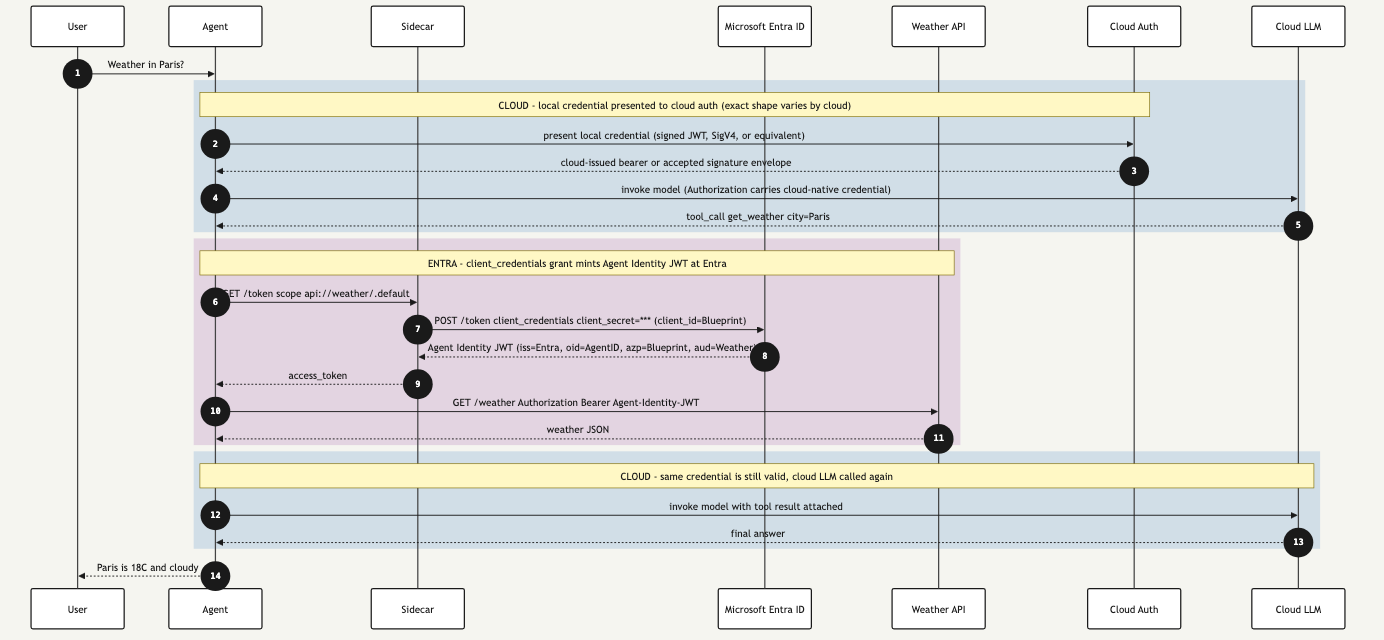
Figure 2. Secret-based request flow. Blue bands are the cloud LLM path (cloud-issued credential). Purple band is the Entra path (client_credentials grant returns an Agent Identity JWT for the Weather API).
Where to find the cloud-specific version. The diagram above keeps the cloud-LLM band generic on purpose. The exact request shape on the blue band is different for each cloud. On GCP it is an SA-JWT exchange at Google OAuth that returns a
ya29...access token. On AWS there is no separate exchange, the LLMInvokeModelrequest is signed in place with SigV4. Dedicated GCP and AWS deep-dives are planned for later in the series.
Reading the diagram
Each colored band is one issuer being authenticated to, with one credential exchange. The interesting object in each band is the credential, not the API token at the end of the chain. The tables below walk the flow from the user’s prompt to the final answer.
Step-by-step
| Steps | Band | What happens |
|---|---|---|
| 1 | — | User asks the agent for the weather in Paris. |
| 2 | 🟦 Blue | Cloud credential exchange. Agent reads the long-lived secret on disk (GCP JSON key, AWS access-key pair, etc.) and uses it to mint or sign the call the cloud LLM will accept. GCP does a separate token exchange. AWS signs the LLM request in place with SigV4. |
| 3 | 🟦 Blue | Cloud returns a bearer token or accepts the signed request. |
| 4 | 🟦 Blue | Agent calls the cloud LLM with the cloud-native Authorization header. |
| 5 | 🟦 Blue | LLM responds with a tool_call get_weather city=Paris. |
| 6 | 🟪 Purple | Agent asks the sidecar for a token scoped to the Weather API. |
| 7 | 🟪 Purple | OAuth2 client_credentials exchange. Sidecar posts grant_type=client_credentials to Entra, with client_id = Blueprint, client_secret = the secret from disk. |
| 8 | 🟪 Purple | Entra returns the Agent Identity JWT, signed by Entra’s JWKS, with iss = Entra v2, oid = Agent Identity object id, azp = Blueprint, aud = Weather API. |
| 9 | 🟪 Purple | Sidecar hands the JWT to the agent. |
| 10 | 🟪 Purple | Agent calls the Weather API with Authorization: Bearer <Agent-Identity-JWT>. |
| 11 | 🟪 Purple | Weather API returns the JSON. |
| 12 | 🟦 Blue | Agent reuses the cloud credential from step 3 (still inside its lifetime) and calls the cloud LLM again with the tool result attached. No new credentials minted. |
| 13 | 🟦 Blue | LLM returns the final answer. |
| 14 | — | Agent delivers the answer to the user. |
Per-band summary
| Band | Credential | What proves identity | JWT or envelope validated downstream | Authenticated party at the API |
|---|---|---|---|---|
| 🟦 Blue, cloud LLM path (steps 2–5, 12–13) | Long-lived cloud secret on disk (GCP JSON key, AWS access-key pair, etc.) | Cloud’s own credential mechanism (JWT exchange, signed request, or equivalent) | Cloud-issued bearer token or SigV4 signature envelope | Cloud principal (service account, IAM role, etc.) the credential is bound to |
| 🟪 Purple, Entra and Weather path (steps 6–11) | Blueprint client_secret | OAuth2 client_credentials grant at Entra v2 | Agent Identity JWT (oid = Agent Identity, azp = Blueprint, aud = Weather API) | Agent Identity, on behalf of the Blueprint |
Putting it together
Blue, purple, blue: cloud LLM, Weather, cloud LLM. Two completely separate credential exchanges run side by side. The cloud credential never touches Entra. The Agent Identity JWT never touches the cloud. The sidecar appears only in the purple band, and only the purple band carries an Agent Identity.
A few points worth pulling out:
- Two completely independent credential chains. The Agent Identity JWT for the Weather API and the cloud-native credential for the LLM come from different issuers. The sidecar mints the first. The cloud client library inside the agent process produces the second.
- The Agent Identity JWT is what downstream APIs see. Its
oidis the Agent Identity’s stable object id. Theazpclaim records that the Blueprint app requested it. The Weather API validates the signature against Entra’s JWKS, checksaud,iss,exp, and returns 200. - The cloud-credential chain never touches the sidecar. In the secret-based pattern the sidecar is not on the cloud-LLM path. The agent process talks to the cloud directly.
Note. Why the sidecar is on one path but not the other
The cloud side never needed a sidecar because the cloud’s credential file is self-contained. Any process that can read it can use it. Entra Agent ID, by contrast, centralises Blueprint credentials and Agent Identity issuance in the sidecar so the agent process is never trusted with secrets. When the federated pattern arrives (in Part 2), the sidecar ends up on both paths because the cloud side finally has a federation contract that benefits from a single credential broker.
What changes between patterns, and what stays the same
With one pattern on the page, the synthesis point is easier to make. Across all four patterns this series covers (secret-based, federated, the user-rooted bootstrap variant, and the Blueprint-secret cloud-federation variant), exactly one seam moves: how the sidecar proves it is the Blueprint application when it asks Entra for the first token. Every other seam is fixed.
What stays the same in every pattern:
- The agent process imports the Entra Agent ID SDK and asks the sidecar for tokens. The agent never sees a credential.
- The sidecar exposes the same local HTTP surface to the agent regardless of how the sidecar itself authenticates to Entra.
- Downstream APIs receive a
Bearer <jwt>whoseoidis the Agent Identity (or a composite, in the user-rooted bootstrap variant). They cannot tell which pattern produced it. - Telemetry, OpenTelemetry traces, cloud-native log sinks, and distributed-trace spans all use the same correlation IDs whether the runtime is your laptop or Azure Container Apps.
What changes:
- The lines of YAML, environment variables, or trust documents that describe how the sidecar proves it is the Blueprint application. That is one configuration block. In the secret-based pattern you saw above, it is a
client_secret. In the federated pattern it is a pointer to IMDS or a signed assertion file. The change is always localized to that block.
Tip. When you read sample code for any pattern in this series and you cannot tell what changed, look for the credential factory in the sidecar’s startup code. That is the seam. Everything else is scaffolding.
Secret-based pattern failure modes (Entra side)
The failure surface in a lower environment is dominated by file-permission and configuration mistakes. The four rows below cover the Entra-side breakage you will see regardless of cloud. Cloud-specific rows (cloud credential missing, IAM permission denied, ADC chain probing metadata, SigV4 clock skew) belong in the cloud-specific deep-dives planned for later in the series.
| # | Symptom | Most likely cause | Where to look first |
|---|---|---|---|
| 1 | Sidecar returns 500 on /token with AADSTS7000215: Invalid client secret | Stale or rotated Blueprint secret in .env | Re-paste the secret, restart the sidecar |
| 2 | Sidecar returns 401 with AADSTS65001 (no admin consent) | Agent SP missing admin consent for User.Read or the weather API scope | setup-obo-client-app.sh re-run or portal grant |
| 3 | Weather API returns 401 {"error":"invalid_audience"} | Agent ID JWT minted for the wrong scope (api://weather/.default is required) | Decode the JWT at jwt.ms, check aud |
| 4 | Sidecar 500 with AADSTS700016: Application ... not found | Sidecar’s AZURE_CLIENT_ID env var still points at a deleted dev app | Sidecar container env vars |
Cloud-side failure rows (ADC chain probing IMDS, GCP PERMISSION_DENIED, AWS SigV4 clock skew, AWS ExpiredToken, IAM role chaining) are cloud-specific. They will be covered in the GCP and AWS deep-dives planned for later in the series.
Up next
Entra Agent ID Across Clouds: Part 2, Federation End to End picks up where this article stops. The secret-based pattern relies on long-lived disk credentials. The federated pattern replaces them with cloud-attested compute and an OIDC trust contract. Part 2 walks the architecture, the request flow, and the failure modes of the federated pattern end to end, plus the standards reasoning behind it.
For new posts in this series, subscribe via the RSS feed or follow along on LinkedIn.
Read next
- Digital Identity
Entra Agent ID Across Clouds: Part 5, Anti-Patterns
Final article in the five-part series on running Microsoft Entra Agent ID against third-party clouds. Closes the loop with the variants and failure modes that consume the same operational budget as the federated pattern without delivering its security properties, and ends with the takeaways worth pinning to the team wiki.
- Digital Identity
Entra Agent ID Across Clouds: Part 4, FIC, Cross-Tenant, and OBO
Fourth article in the five-part series on running Microsoft Entra Agent ID against third-party clouds. Opens up the Federated Identity Credential as a first-class object: single-tenant, cross-tenant SaaS shape, and the orthogonal world of on-behalf-of (OBO) where the agent acts for a signed-in user.
- Digital Identity
Entra Agent ID Across Clouds: Part 3, Managed Identity and Entra Objects
Third article in the five-part series on running Microsoft Entra Agent ID against third-party clouds. Pins down what the UAMI actually is in this architecture, why SAMI breaks federation, the three distinct Entra objects (UAMI, Blueprint, Agent Identity) and the three claims (sub, azp, oid) they each populate, and the production trade-off between federating the UAMI or the Agent Identity to the cloud.
Worth reading again?
Get the next one in your inbox.