Entra Agent ID Across Clouds: Part 4, FIC, Cross-Tenant, and OBO
About this series. Five articles on running Microsoft Entra Agent ID against third-party clouds. Each one focuses on one layer of the trust story so you can read whichever part you actually need.
- Entra Agent ID Across Clouds: Part 1, Lower Environment and Secrets
- Entra Agent ID Across Clouds: Part 2, Federation End to End
- Entra Agent ID Across Clouds: Part 3, Managed Identity and Entra Objects
- Entra Agent ID Across Clouds: Part 4, FIC, Cross-Tenant, and OBO (this article)
- Entra Agent ID Across Clouds: Part 5, Anti-Patterns
What this article covers
Part 3 treated the Federated Identity Credential (FIC) as a black box: “the UAMI authenticates as the Blueprint via FIC.” This article opens that box. FIC is one primitive with two interesting deployments and one orthogonal use, and each one buys you something different:
- Single-tenant FIC is the default federated shape from Parts 2 and 3. UAMI and Blueprint in the same tenant.
- Cross-tenant FIC is the SaaS shape. UAMI in the customer’s tenant, Blueprint in the vendor’s tenant. One Blueprint can carry many cross-tenant FIC entries, one per customer.
- On-behalf-of (OBO) is a completely separate axis. It controls whose identity the agent is acting as on the downstream call (its own, or a signed-in user’s). It is independent of how the sidecar proves it is the Blueprint.
By the end you will know which FIC entry to author for which deployment, why OBO is not “the federated pattern with extra steps,” and what the composite Agent+User JWT actually carries on the wire. Part 5 walks the variants people are tempted to try and why most of them turn into anti-patterns.
Federated Identity Credential for single-tenant and cross-tenant
The FIC half of the federated pattern has its own dimension you should understand: the managed identity and the Blueprint application do not have to live in the same Entra tenant. That distinction unlocks a SaaS deployment model.
Single-tenant FIC
This is the normal case. The UAMI and the Blueprint application both live in tenant T1.
| FIC field | Value |
|---|---|
issuer | https://sts.windows.net/T1/ |
subject | <UAMI oid> |
audiences | ["api://AzureADTokenExchange"] |
The sidecar posts to login.microsoftonline.com/T1/oauth2/v2.0/token with client_assertion=<MI-JWT> and client_id=<Blueprint>. Same tenant, same issuer, same audience as the FIC entry. Entra runs the FIC match, decides the assertion is acceptable, and mints the Agent Identity JWT.
Cross-tenant FIC
This is the SaaS pattern. The UAMI lives in the customer’s tenant T2. The Blueprint lives in the vendor’s tenant T1.
| FIC field | Value |
|---|---|
issuer | https://login.microsoftonline.com/T2/v2.0 (the customer’s tenant) |
subject | <UAMI oid in T2> |
audiences | ["api://AzureADTokenExchange"] |
Two things change on the wire compared to single-tenant. The UAMI requests its IMDS assertion with audience=api://AzureADTokenExchange exactly as before, but the JWT it receives is signed by tenant T2’s signing key. The sidecar still posts the resulting client_assertion to T1 (the Blueprint’s home tenant). Entra T1 looks up the Blueprint, finds a FIC entry whose issuer matches the JWT’s issuer (T2’s v2.0 endpoint), validates the signature against T2’s JWKS, and mints the Agent Identity JWT.
   Customer tenant T2                        Vendor tenant T1
   ─────────────────                         ────────────────

   ACA app + UAMI
       │
       │ IMDS
       ▼
   MI JWT signed by T2 ──────────▶ POST to login.microsoftonline.com/T1/
   (iss = T2 v2.0,                 client_assertion = MI JWT
    sub = UAMI oid in T2,          client_id = <vendor Blueprint>
    aud = AzureADTokenExchange)    scope = api://weather/.default
                                          │
                                          ▼
                                   FIC entry on Blueprint:
                                     iss = T2 v2.0
                                     sub = UAMI oid in T2
                                     aud = AzureADTokenExchange
                                          │
                                          ▼
                                   Agent Identity JWT (signed by T1)
One Blueprint can carry many cross-tenant FIC entries, one per customer tenant the agent is deployed into. No shared secrets, ever. Onboarding a customer is adding one FIC entry. Off-boarding is removing one FIC entry. The Blueprint never holds anything the customer could leak.
Note. Why this matters for ISVs
An ISV shipping an agent into many customer tenants traditionally faces a choice between giving each customer a copy of a secret or building elaborate per-customer key vaults. Cross-tenant FIC removes the question entirely. Each customer’s ACA-hosted UAMI federates into the ISV’s Blueprint. The ISV’s audit logs show which customer tenant minted each token (the
tidclaim survives end to end). Revocation is per-customer (remove the FIC entry). Onboarding is per-customer (add a FIC entry).
Tip. FIC entries have a hard limit per application (currently 20 in the General Availability surface, with a higher cap rolling out). If you are an ISV with hundreds of customers, plan for sharding: one Blueprint per N customers, with a routing layer that picks the right
client_idper request. The Agent Identity downstream looks identical across shards. Only the Blueprint changes.
On-behalf-of is orthogonal to all of this
A common point of confusion: when the agent needs to call a downstream API as the user, not as the agent itself, you use the on-behalf-of (OBO) flow. OBO is independent of how the sidecar proves it is the Blueprint application. Only the client_* slot of the OBO request changes.
| Sidecar authentication mode | Slot in the OBO grant |
|---|---|
| Client secret (secret-based, including the Blueprint-secret cloud-federation variant) | client_secret=<BLUEPRINT_CLIENT_SECRET> |
| Single-tenant FIC (federated, same tenant) | client_assertion=<MI-JWT from T1> |
| Cross-tenant FIC (federated, SaaS) | client_assertion=<MI-JWT from T2 with aud=AzureADTokenExchange> |
The OBO request itself always has the same shape:
POST https://login.microsoftonline.com/<blueprint-tenant>/oauth2/v2.0/token
  grant_type=urn:ietf:params:oauth:grant-type:jwt-bearer
  client_id=<blueprint>
  [client_secret OR client_assertion + client_assertion_type]
  assertion=<user-jwt>
  requested_token_use=on_behalf_of
  scope=api://weather/.default
The response is a composite JWT: oid=AgentIdentity, xms_id_act.oid=User, scp=<user's delegated scopes>. The downstream API validates both identities in one signature check. The agent code is unchanged across all three sidecar modes. The sidecar absorbs the difference.
OBO request flow
OBO is the same shape under both patterns. What differs is one slot in the OBO POST body: secret-based deployments fill the client_secret slot, federated deployments fill the client_assertion slot with an MI JWT. The user JWT, the composite JWT, and the downstream call are byte-for-byte identical across both. To make that visible, the next two subsections walk the two flows separately, and the closing paragraph spells out which steps are shared and which are pattern-specific.
OBO is also identical across clouds. The diagrams below have zero cloud-specific actors. The cloud-LLM concern is orthogonal to OBO. When your agent calls a cloud LLM as part of an OBO turn, that call sits inside the blue band from the pattern walkthroughs in Part 2.
Secret-based OBO request flow
Six actors. No MI endpoint. The sidecar reads the Blueprint client secret from disk or env, and uses it to authenticate to Entra during the OBO grant.
Legend: 🟪 Entra path (interactive sign-in → user JWT → OBO grant authenticated with client_secret → composite Agent+User JWT) ⬛ Downstream API (validates both identities in one signature check)
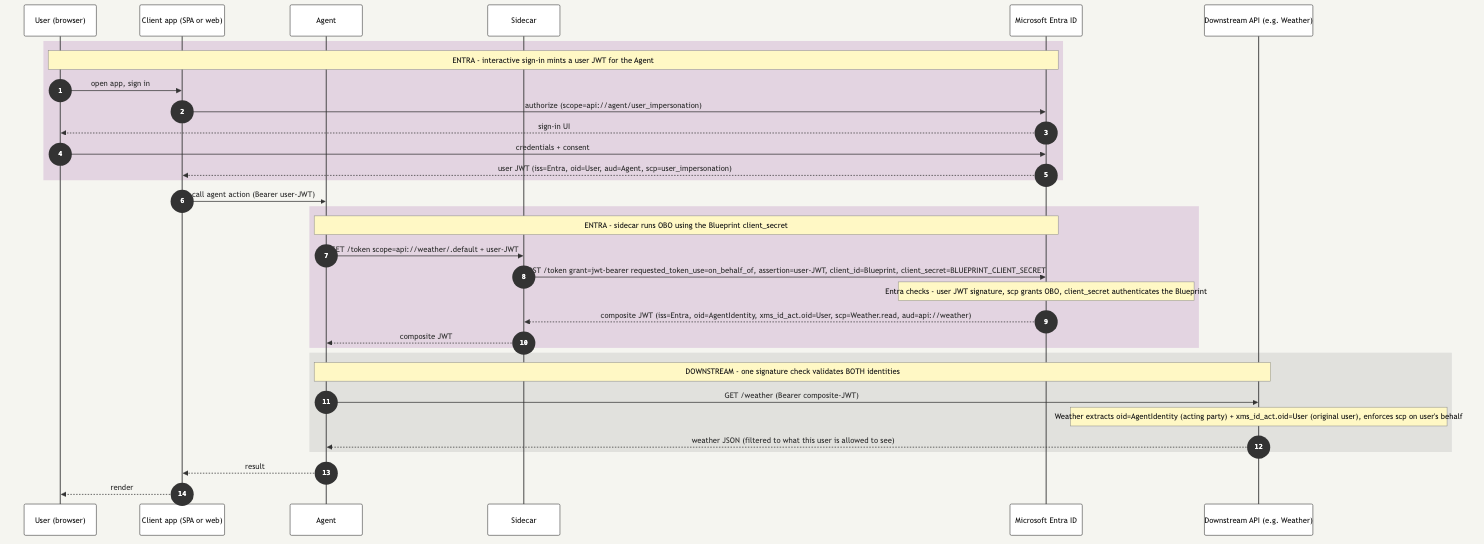
Figure 1. Secret-based OBO. The Blueprint authenticates with client_secret on disk. The composite JWT carries both identities so the downstream API can enforce per-user policy in a single signature check.
Step-by-step
| Steps | Band | What happens |
|---|---|---|
| 1 | 🟪 Purple | User opens the client app and starts an interactive sign-in. |
| 2 | 🟪 Purple | Client app redirects to Entra with scope=api://agent/user_impersonation. |
| 3 | 🟪 Purple | Entra returns the sign-in UI to the user’s browser. |
| 4 | 🟪 Purple | User submits credentials and consents to the requested scopes. |
| 5 | 🟪 Purple | Entra returns the user JWT to the client (iss=Entra, oid=User, aud=Agent, scp=user_impersonation). |
| 6 | — | Client calls the agent’s HTTP endpoint with Authorization: Bearer <user-JWT>. |
| 7 | 🟪 Purple | Agent forwards the user JWT to the sidecar and asks for a token scoped to api://weather/.default. |
| 8 | 🟪 Purple | OBO grant. Sidecar posts to Entra with grant_type=jwt-bearer, requested_token_use=on_behalf_of, assertion=<user-JWT>, client_id=<Blueprint>, client_secret=<BLUEPRINT_CLIENT_SECRET>. |
| 9 | 🟪 Purple | Entra validates the user JWT, checks that the user’s scp permits OBO, authenticates the Blueprint via client_secret, and returns the composite JWT (oid=AgentIdentity, xms_id_act.oid=User, scp=Weather.read, aud=api://weather). |
| 10 | 🟪 Purple | Sidecar hands the composite JWT back to the agent. |
| 11 | ⬛ Downstream | Agent calls the Weather API with Authorization: Bearer <composite-JWT>. |
| 12 | ⬛ Downstream | Weather API validates one signature, sees both oid=AgentIdentity and xms_id_act.oid=User, applies user-scoped filtering, and returns the JSON. |
| 13 | — | Agent returns the result to the client app. |
| 14 | — | Client app renders the answer for the user. |
Per-band summary
| Band | Credential | Grant or call | Output | Identity the API sees |
|---|---|---|---|---|
| 🟪 Purple, sign-in (steps 1–5) | User’s interactive credentials | OIDC authorization code (or equivalent MSAL flow) | User JWT (oid=User, aud=Agent, scp=user_impersonation) | n/a, this band ends at the client app |
| 🟪 Purple, OBO (steps 7–10) | Blueprint client_secret from disk or env, plus the user JWT as assertion | OAuth2 OBO grant at Entra v2 | Composite JWT (oid=AgentIdentity, xms_id_act.oid=User, scp=<user delegated>) | n/a, sidecar returns the JWT to the agent |
| ⬛ Downstream (steps 11–12) | Composite JWT | Single bearer call to the Weather API | Weather JSON, filtered to what the user is allowed to see | Both identities at once: Agent Identity is the acting party, User is the original subject |
Federated OBO request flow
Seven actors. The MI endpoint is back. The sidecar fetches an MI JWT from the ACA managed-identity endpoint and uses it as a client_assertion against the Blueprint’s Federated Identity Credential during the OBO grant. Nothing on disk authenticates the Blueprint.
Legend: 🟪 Entra path (interactive sign-in → user JWT → OBO grant authenticated with MI JWT as client_assertion → composite Agent+User JWT) ⬛ Downstream API (validates both identities in one signature check)
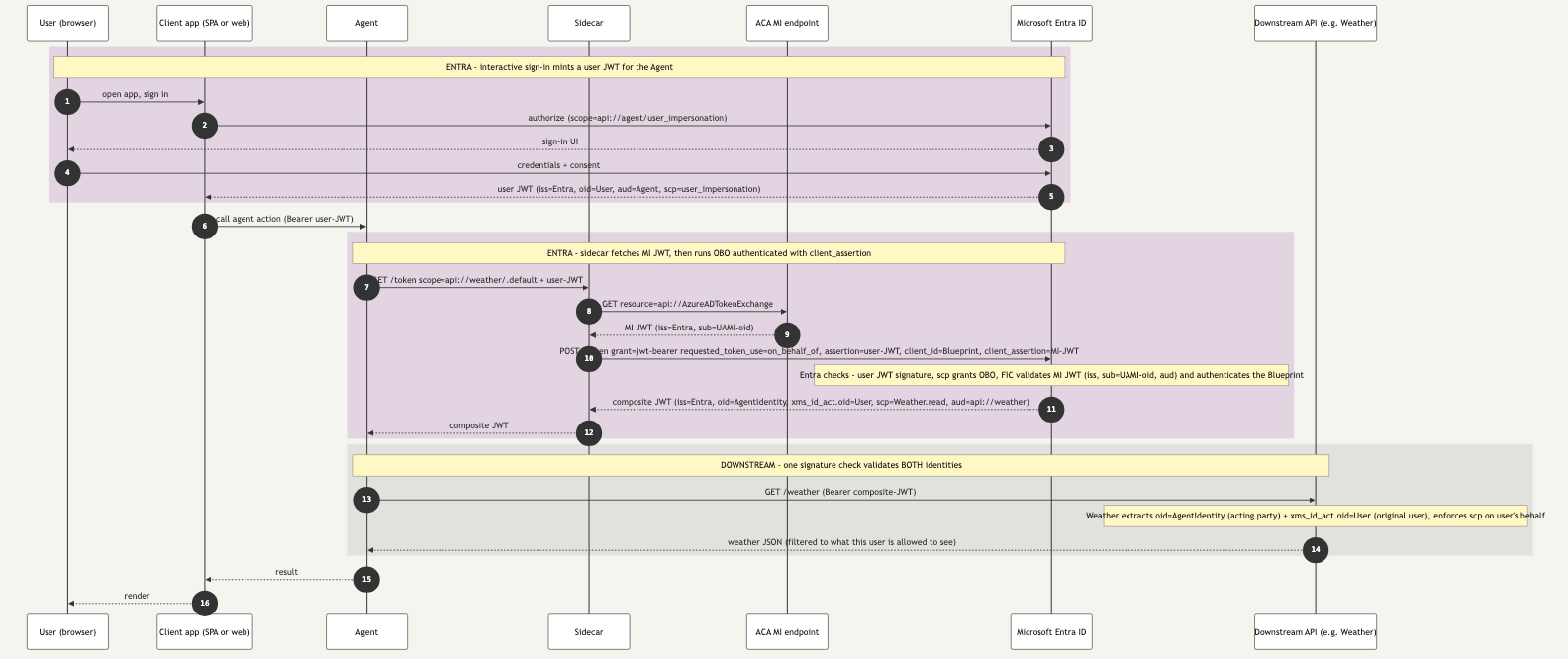
Figure 2. Federated OBO. The Blueprint authenticates with an MI JWT presented as client_assertion and validated against the FIC. Same composite JWT, same downstream call. Only the credential slot changes.
Step-by-step
| Steps | Band | What happens |
|---|---|---|
| 1 | 🟪 Purple | User opens the client app and starts an interactive sign-in. |
| 2 | 🟪 Purple | Client app redirects to Entra with scope=api://agent/user_impersonation. |
| 3 | 🟪 Purple | Entra returns the sign-in UI to the user’s browser. |
| 4 | 🟪 Purple | User submits credentials and consents to the requested scopes. |
| 5 | 🟪 Purple | Entra returns the user JWT to the client (iss=Entra, oid=User, aud=Agent, scp=user_impersonation). |
| 6 | — | Client calls the agent’s HTTP endpoint with Authorization: Bearer <user-JWT>. |
| 7 | 🟪 Purple | Agent forwards the user JWT to the sidecar and asks for a token scoped to api://weather/.default. |
| 8 | 🟪 Purple | Sidecar calls the ACA managed-identity endpoint with resource=api://AzureADTokenExchange. |
| 9 | 🟪 Purple | Endpoint returns the MI JWT (iss=Entra, sub=UAMI-oid, aud=api://AzureADTokenExchange). No file on disk authenticates the Blueprint. |
| 10 | 🟪 Purple | OBO grant with FIC. Sidecar posts to Entra with grant_type=jwt-bearer, requested_token_use=on_behalf_of, assertion=<user-JWT>, client_id=<Blueprint>, client_assertion=<MI-JWT>. |
| 11 | 🟪 Purple | Entra validates the user JWT, checks scp permits OBO, runs the FIC check (iss, sub=UAMI-oid, aud allow-listed) to authenticate the Blueprint, and returns the composite JWT (oid=AgentIdentity, xms_id_act.oid=User, scp=Weather.read, aud=api://weather). |
| 12 | 🟪 Purple | Sidecar hands the composite JWT back to the agent. |
| 13 | ⬛ Downstream | Agent calls the Weather API with Authorization: Bearer <composite-JWT>. |
| 14 | ⬛ Downstream | Weather API validates one signature, sees both oid=AgentIdentity and xms_id_act.oid=User, applies user-scoped filtering, and returns the JSON. |
| 15 | — | Agent returns the result to the client app. |
| 16 | — | Client app renders the answer for the user. |
Per-band summary
| Band | Credential | Grant or call | Output | Identity the API sees |
|---|---|---|---|---|
| 🟪 Purple, sign-in (steps 1–5) | User’s interactive credentials | OIDC authorization code (or equivalent MSAL flow) | User JWT (oid=User, aud=Agent, scp=user_impersonation) | n/a, this band ends at the client app |
| 🟪 Purple, OBO (steps 7–12) | MI JWT from the ACA managed-identity endpoint, plus the user JWT as assertion | OAuth2 OBO grant at Entra v2 with FIC validating the client_assertion | Composite JWT (oid=AgentIdentity, xms_id_act.oid=User, scp=<user delegated>) | n/a, sidecar returns the JWT to the agent |
| ⬛ Downstream (steps 13–14) | Composite JWT | Single bearer call to the Weather API | Weather JSON, filtered to what the user is allowed to see | Both identities at once: Agent Identity is the acting party, User is the original subject |
What to read from the two diagrams
- The interactive sign-in band (steps 1 to 6) is identical in both patterns. The user proves who they are to Entra, and Entra issues a user JWT with
aud=Agentand the delegated scopes the user consented to. The agent has not done anything yet. - Step 7 is the client app forwarding the user JWT to the agent as a bearer token. The agent now has the user’s token in hand.
- The OBO band is where the two diagrams diverge. The sidecar combines the user JWT (as
assertion) with the Blueprint credential (asclient_*) and asks Entra to mint a token that represents both identities. Theclient_*slot is the only thing that varies by pattern:- Secret-based.
client_secret=<BLUEPRINT_CLIENT_SECRET>. No MI JWT step. The sidecar reads the secret from disk or env. - Federated, same tenant.
client_assertion=<MI-JWT>. The MI JWT step runs first, then the FIC validates it. - Federated, cross-tenant SaaS.
client_assertion=<MI-JWT from customer tenant>, posted to the Blueprint’s tenant. The MI JWT step runs against the customer’s IMDS, then the FIC on the vendor tenant’s Blueprint validates it.
- Secret-based.
- The composite JWT is the same shape under both patterns. Two identities in one signature:
oid=AgentIdentity(who is calling, the acting party),xms_id_act.oid=User(on whose behalf, the original subject),scp(what the user delegated). The downstream API validates this in exactly one signature check. No second hop, no token exchange on the data path. - The downstream call is also identical. The Weather API sees both identities and can enforce user-scoped authorization (filter rows to what this user is allowed to see) while logging which agent made the call.
The orthogonality, restated
OBO concerns the caller: agent alone, or agent on behalf of a user. The secret-based-versus-federated choice concerns the Blueprint credential: secret on disk, or MI JWT from the runtime. The two axes are independent. Any combination is valid. Agent code is identical across all four cells. The sidecar absorbs the difference.
| Agent acts as itself | Agent acts on behalf of user (OBO) | |
|---|---|---|
| Secret-based | Blueprint client_secret → client credentials grant → Agent Identity JWT | Blueprint client_secret → OBO grant with user JWT as assertion → composite Agent+User JWT |
| Federated | MI JWT as client_assertion → client credentials grant → Agent Identity JWT | MI JWT as client_assertion → OBO grant with user JWT as assertion → composite Agent+User JWT |
Tip. If you are introducing OBO to an existing agent, start by isolating the change to the sidecar’s token endpoint. The agent code should only ever say “give me a token for
api://weatherthat represents the current request.” Whether that current request carries a user JWT (OBO) or not (client credentials) is the sidecar’s decision based on what arrived on the wire. The agent never needs to know.
Caution. The composite JWT is more sensitive than a plain Agent Identity JWT. It carries the user’s
scpclaims. A composite JWT minted for User-A and replayed by an attacker is the moral equivalent of impersonating User-A. Treat OBO tokens with the same care as user access tokens: never log the raw token, never put it in a URL, prefer per-request scope-narrowing (scope=api://weather/Weather.Readnotapi://weather/.default) when the downstream API supports it.
Up next
Entra Agent ID Across Clouds: Part 5, Anti-Patterns closes the series with the variants people are tempted to try and why most of them turn into anti-patterns: the user-rooted bootstrap, the Blueprint-secret cloud-federation hybrid, the laptop-with-fake-IMDS, the “let’s just share one secret across customers” SaaS shortcut, and a few others. Part 5 is the “what not to do” companion to everything Parts 1 through 4 walked.
For new posts in this series, subscribe via the RSS feed or follow along on LinkedIn.
Read next
- Digital Identity
Entra Agent ID Across Clouds: Part 5, Anti-Patterns
Final article in the five-part series on running Microsoft Entra Agent ID against third-party clouds. Closes the loop with the variants and failure modes that consume the same operational budget as the federated pattern without delivering its security properties, and ends with the takeaways worth pinning to the team wiki.
- Digital Identity
Entra Agent ID Across Clouds: Part 3, Managed Identity and Entra Objects
Third article in the five-part series on running Microsoft Entra Agent ID against third-party clouds. Pins down what the UAMI actually is in this architecture, why SAMI breaks federation, the three distinct Entra objects (UAMI, Blueprint, Agent Identity) and the three claims (sub, azp, oid) they each populate, and the production trade-off between federating the UAMI or the Agent Identity to the cloud.
- Digital Identity
Entra Agent ID Across Clouds: Part 2, Federation End to End
Second article in the five-part series on running Microsoft Entra Agent ID against third-party clouds. Walks the federated pattern as two parallel federations sharing one managed-identity JWT, explains why a laptop cannot participate, and shows what actually travels on the wire (including the audience GUID that catches most first deploys).
Worth reading again?
Get the next one in your inbox.