Entra Agent ID Across Clouds: Part 2, Federation End to End
About this series. Five articles on running Microsoft Entra Agent ID against third-party clouds. Each one focuses on one layer of the trust story so you can read whichever part you actually need.
- Entra Agent ID Across Clouds: Part 1, Lower Environment and Secrets
- Entra Agent ID Across Clouds: Part 2, Federation End to End (this article)
- Entra Agent ID Across Clouds: Part 3, Managed Identity and Entra Objects
- Entra Agent ID Across Clouds: Part 4, FIC, Cross-Tenant, and OBO
- Entra Agent ID Across Clouds: Part 5, Anti-Patterns
What this article covers
Part 1 walked the secret-based pattern, the shape an agent uses in a lower environment where the host carries long-lived credentials on disk. This article walks the production answer: the federated pattern, where nothing long-lived sits on the container’s filesystem and every credential is minted on demand from a runtime-attested managed-identity token.
The mechanism is two independent federations running in parallel, both seeded by the same managed-identity (MI) JWT. One federation goes to the third-party cloud (GCP Workload Identity Federation, AWS OIDC provider plus role trust policy, or equivalent) to obtain the cloud-side credential. The other goes to Microsoft Entra ID, via a Federated Identity Credential (FIC) on the Blueprint, to obtain the Agent Identity JWT for the Weather API. The two federations are structurally similar, the input JWT is the same, and the two downstream identities the chain lands at are completely different.
By the end you will know what a managed identity actually is (a credential-less workload identity attested by the cloud), why the federated pattern cannot run on a laptop, what the audience claim on the wire actually looks like (a GUID, not the URI you typed), and how the request flow runs end to end in the higher environment. The Entra objects involved (the Blueprint, the Agent Identity, the FIC, the UAMI) are the subject of Part 3.
The federated pattern as two parallel federations
Most explanations of the federated pattern describe it as “secretless.” That is the outcome, not the mechanism. The mechanism is that you are running two independent federations in parallel, and both happen to use the same runtime-issued OIDC token as their input.
              Managed identity (the shared trust anchor)
                            │
                ┌───────────┴───────────┐
                │                       │
     Federation #1: cloud WIF    Federation #2: Entra FIC
     (Workload Identity         (Federated Identity
      Federation)                 Credential)
     MI JWT → cloud STS via      MI JWT → Microsoft Entra
     the cloud's WIF             ID via the Blueprint's
     provider                    FIC
                │                       │
       replaces the cloud key    replaces the Blueprint secret
                │                       │
                ▼                       ▼
       Cloud-issued credential   Agent Identity JWT
       (for the cloud LLM)       (for the Weather API)
Figure 1. The federated pattern as two parallel federations. Both branches consume the same MI JWT. The cloud branch replaces the long-lived cloud key from the secret-based pattern. The Entra branch replaces the Blueprint client secret.
The Blueprint-secret cloud-federation variant (covered in Part 5) runs Federation #1 only. The federated pattern runs both. Once you see the federated pattern this way, you can also see why a laptop cannot participate: both federations starve simultaneously for the same reason. Neither one can get an IMDS-issued token because there is no IMDS to ask.
Note. The audience pun that makes dual federation cheap
The audience string
api://AzureADTokenExchangeis recognized by both Microsoft Federated Identity Credential (FIC) and the cloud-side federation contracts (GCP Workload Identity Federation, AWS OIDC provider plus role trust policy). A single managed-identity token request produces a JWT that either federation will accept. In practice the agent and the sidecar each make their own IMDS call because they live in different containers, but the JWTs they receive are structurally identical.AWS adds one extra hop because its STS rejects v2.0 audiences by default, but the architectural shape is the same. The AWS-specific workaround (an intermediary Entra app) is planned for a later cloud-specific article.
Why a laptop cannot run the federated pattern
This is the question that trips up nearly everyone the first time they try to “just run the federated pattern locally.” The short answer is: there is no IMDS on a laptop. The longer answer is more interesting, because it tells you what managed identity actually is.
A managed identity has no credential. There is no key file you can download, no certificate you can export, no secret you forgot to copy. What Entra trusts about a managed identity is that the Azure hypervisor will attest, at the moment of the token request, that the calling code really is the workload it claims to be. The attestation happens inside the platform. The metadata service at 169.254.169.254 is the only place in the world that can produce the assertion, and it only answers from inside the running, attested compute instance.
                  Azure datacenter
        ┌──────────────────────────────────────────────────────────────┐
        │  ┌──────────────┐                                            │
        │  │  Your VM     │ ──GET──▶ 169.254.169.254/metadata/...      │
        │  │  or ACA app  │ ◀─JWT─── signed by Entra, sub=<UAMI oid>   │
        │  └──────────────┘                                            │
        └──────────────────────────────────────────────────────────────┘

                  Your laptop
        ┌──────────────────────────────────────────────────────────────┐
        │  GET 169.254.169.254  →  ✗ connection refused                │
        │  (link-local address unrouted, nothing is listening)         │
        └──────────────────────────────────────────────────────────────┘
Figure 2. The managed-identity endpoint at 169.254.169.254 is reachable only from inside attested Azure compute. The same call from a laptop has nowhere to land.
This is not a gap in tooling. It is the security primitive itself. When a laptop could mint a UAMI assertion, anyone who copied a UAMI’s identifier could mint one too, and the entire credential-less promise of managed identity would collapse.
The table below lists the workarounds people try, and why each one fails by design.
| What people try | Why it doesn’t work |
|---|---|
az login --identity on the laptop | The Azure CLI tries to reach IMDS at 169.254.169.254. The connection times out. |
DefaultAzureCredential locally | It falls through to your interactive az login credentials. You authenticate as yourself, not as the UAMI. |
Forging a JWT with sub=<UAMI oid> | Entra requires assertions to be signed by its IMDS signer. The forgery has the wrong signature. |
| Exporting the UAMI’s “key” | There is no key. That is the entire point. |
| Running an IMDS emulator | Emulators produce fake tokens, not Entra-signed ones. Entra will reject them. |
| SSHing into an Azure VM and tunneling IMDS to your laptop | The token IMDS returns is bound to that VM’s context via the xms_mirid claim. You have moved the problem, not solved it. |
Note. This pattern is not unique to Azure. AWS instance roles, GCP metadata-server service accounts, and GitHub Actions OIDC tokens all work the same way. Every cloud’s “no secrets” story depends on a runtime attestation surface that only exists inside that cloud’s compute. Take the workload off and the magic stops.
What this means for an inner loop: three options, in order of recommendation.
| Option | What you get | Trade-off |
|---|---|---|
| Stay on the secret-based pattern | Blueprint secret plus cloud credential, exactly as the sample ships | Two secrets on disk, identical agent code to production |
Move dev into Azure (Codespaces on an Azure VM, or az containerapp up for inner loop) | Real UAMI, real federated pattern, no laptop secrets | Slower inner loop and a meter running |
| Use the Blueprint-secret cloud-federation variant (see Part 5) | The Blueprint secret does double duty as the cloud subject token, and the cloud credential file disappears | Still one secret on disk, only one |
Tip. “The secret-based pattern is for laptops. The federated pattern is for cloud.” That is the correct architectural boundary, not a workaround. Trying to make UAMI work on a laptop is fighting the security model.
How cloud federation works
Cloud federation is the cloud’s way of saying “I delegate authentication to an external identity provider I have decided to trust.” The configuration on the cloud’s side takes the same four pieces of information, regardless of cloud, even when the field names differ.
- The issuer URL of the IdP’s OpenID Connect discovery document. The IdP must publish its JWKS publicly.
- The allowed audience(s), the
audclaim the cloud will accept on incoming tokens. - The attribute mapping, how claims in the incoming token map onto cloud-side principal attributes.
- The attribute condition (or equivalent), an additional gate. Always set this. Trusting the issuer alone is too broad.
The field names differ by cloud:
| Concept | GCP (Workload Identity Federation) | AWS (OIDC provider + role trust policy) |
|---|---|---|
| Issuer URL | --issuer-uri on the provider | Url on the OIDC provider |
| Allowed audience(s) | --allowed-audiences list | ClientIDList on the OIDC provider, plus aud Condition in the role trust policy |
| Attribute mapping | --attribute-mapping (Google subject ← claim) | Claims surface as <issuer>:<claim> keys inside the trust-policy Condition block |
| Attribute condition | --attribute-condition expression | Condition block in the role trust policy |
| Bound cloud principal | Service account, via roles/iam.workloadIdentityUser | IAM role, via sts:AssumeRoleWithWebIdentity |
Because the contract is “any compliant OIDC issuer,” both clouds accept tokens from a surprisingly large set of identity providers today. Each of these has a working /.well-known/openid-configuration endpoint:
login.microsoftonline.com/<tenant>/v2.0, Entra users, applications, and managed identitiesaccounts.google.com, cross-project Googletoken.actions.githubusercontent.com, GitHub Actions OIDCvstoken.dev.azure.com/<org>, Azure DevOpsgitlab.com, GitLab CIoidc.eks.<region>.amazonaws.com/id/<cluster>, EKS IRSAkubernetes.default.svc, any Kubernetes cluster with service-account issuer discovery enabled- Self-hosted Keycloak, Auth0, Okta, Ping, and similar
Note. Secretless is a consequence, not a definition
Cloud federation does not require the absence of secrets. It requires a trusted issuer. When the issuer can mint tokens to a workload without the workload holding a secret (managed identity, IRSA, CI OIDC), the whole chain becomes secretless. When the issuer needs a secret to mint the token (Blueprint client credentials), only the cloud-side hop becomes secretless. That second case is exactly what the Blueprint-secret cloud-federation variant is.
What the tokens actually carry on the wire
The previous section laid out the federation contract in the abstract. To debug a real deployment you also need to know what shows up on the wire, because the values that travel inside the JWT are not always the values you typed at the command line. Two specific quirks of Entra-issued tokens cause more first-day federation failures than every other configuration mistake combined.
The audience claim is a GUID rather than a URI
When the agent or sidecar calls IMDS with resource=api://AzureADTokenExchange, the token that comes back does not carry api://AzureADTokenExchange in its aud claim. Entra normalizes first-party resource identifiers to their underlying application ID. The string that actually appears in the JWT is:
aud = fb60f99c-7a34-4190-8149-302f77469936That GUID is the appId of the Azure AD Token Exchange first-party application. The URI form is an alias for it. Entra accepts either name as input but always emits the GUID on the wire.
Cloud federation contracts compare incoming aud claims against the allow-list byte for byte. A provider configured with the URI alone rejects every token because the value on the wire is the GUID. The correct configuration lists both strings.
Caution. This is the single most common cause of “the cloud rejects my token” on first deploy. The error message is usually generic, the symptom is that nothing seems to work, and the fix is one missing string in the allow-list. Add both values from day one.
A worked example of one JWT across two clouds
To make the validation logic concrete, follow a single managed-identity token through both clouds’ trust contracts. The values below are placeholders, but the shapes are exactly what you will see in production.
Shared inputs:
| Field | Value |
|---|---|
| Tenant id | 11111111-1111-1111-1111-111111111111 |
| UAMI client id | 22222222-2222-2222-2222-222222222222 |
UAMI object id (oid_U) | 33333333-3333-3333-3333-333333333333 |
| Resource requested from IMDS | api://AzureADTokenExchange |
The IMDS call:
GET http://169.254.169.254/metadata/identity/oauth2/token
    ?api-version=2018-02-01
    &resource=api%3A%2F%2FAzureADTokenExchange
    &client_id=22222222-2222-2222-2222-222222222222
Header: Metadata: true
The decoded JWT:
{
  "iss": "https://login.microsoftonline.com/11111111-1111-1111-1111-111111111111/v2.0",
  "sub": "33333333-3333-3333-3333-333333333333",
  "aud": "fb60f99c-7a34-4190-8149-302f77469936",
  "oid": "33333333-3333-3333-3333-333333333333",
  "tid": "11111111-1111-1111-1111-111111111111",
  "idtyp": "app",
  "exp": 1748736000
}
The two clouds’ contracts side by side:
| Field | GCP (WIF provider) | AWS (OIDC provider + role trust policy) |
|---|---|---|
| Trust object | azure-pool/azure-provider | OIDC provider arn:aws:iam::…:oidc-provider/sts.windows.net/<tenant>/ + role |
| Audience allow-list | ["api://AzureADTokenExchange", "fb60f99c-...-936"] | ClientIDList on the OIDC provider, plus aud Condition on the role |
| Subject gate | --attribute-condition="assertion.sub == '<UAMI oid>'" | Condition block: "sts.windows.net/<tenant>/:sub": "<UAMI oid>" |
| Bound principal | Service account, via workloadIdentityUser binding | IAM role, via AssumeRoleWithWebIdentity |
| Extra hop? | Yes, generateAccessToken to impersonate the SA | No, STS returns ready-to-use temp credentials |
Out-of-the-box accepts v2.0 GUID aud? | Yes | No, requires an intermediary Entra app to mint a v1 token with a workload-scoped audience |
The per-cloud call shapes (including the AWS intermediary-app workaround) belong in dedicated cloud-specific articles, planned for later in the series.
What the standards require
Both clouds implement the same set of token-validation specifications. Where they differ is in the convenience surface they expose on top of those specifications.
| Specification | What it defines | GCP implementation | AWS implementation |
|---|---|---|---|
| RFC 7519 (JWT) | aud is a recipient identifier, value may be a string or an array | Validates aud against the provider’s allowed-audiences list | Validates aud against the role’s trust-policy Condition block |
| RFC 7523 (JWT bearer for OAuth 2.0) | aud should identify the authorization server, sub identifies the principal | Implemented as Workload Identity Federation | Implemented as AssumeRoleWithWebIdentity |
| RFC 8693 (OAuth 2.0 Token Exchange) | Defines the subject_token exchange protocol | https://sts.googleapis.com/v1/token follows it directly | AWS STS predates the RFC, exposes equivalent semantics through AssumeRoleWithWebIdentity |
| OIDC Core 1.0 | aud must contain the relying party’s identifier, additional values are allowed | Permits N values in allowed-audiences | Permits N values in StringEquals arrays |
Nothing in any of these specifications says “the audience must be unique to this workload.” That is a convention layered on top of the standards. AWS’s operator tooling encourages one role per workload-scoped audience because each role becomes its own tightly bounded trust surface. GCP’s tooling encourages one provider per cloud-to-cloud relationship, with per-workload narrowing done through sub. Same RFCs, two community-of-practice defaults.
Note. Why the convention difference matters more than it should
The audience field in an OIDC token has no enforcement semantics by itself. It is a label, and the trust contract decides what to do with it. AWS chose to make the label workload-scoped because each role is its own trust surface. GCP chose to make the label cloud-scoped because the trust surface is the provider, and per-workload differentiation lives below it in
sub. Both choices are defensible. The reason this matters for cross-cloud architecture is that an MI token engineered for one convention does not fit the other without an intermediary.
Why the same token federates to one cloud but not another
In one sentence: a cloud’s federation contract accepts a token only when the trust document was authored with audience and subject values matching what the token actually carries. GCP’s WIF provider is typically authored with the tenant-wide audience Entra puts on the wire, so the MI token federates in one hop. AWS’s role trust policy is typically authored with a workload-scoped audience, so the MI token has to be re-shaped at an intermediary Entra application before AWS will accept it. The MI token is identical in both cases. The trust contracts on the receiving ends are different by design choice, not by protocol constraint.
To make the same MI token federate to AWS in one hop, the role would have to be authored with:
"Condition": {
  "StringEquals": {
    "sts.windows.net/11111111-...-111/:aud": "fb60f99c-7a34-4190-8149-302f77469936",
    "sts.windows.net/11111111-...-111/:sub": "33333333-3333-3333-3333-333333333333"
  }
}
That would work. The trade is that the role’s audience trust would be tenant-wide rather than workload-scoped, and any UAMI in the tenant whose oid happened to match the policy’s sub condition could assume the role. Most AWS deployments add the intermediary application because the security review prefers per-workload audiences. GCP deployments accept the tenant-wide audience because the provider is already per-cloud-relationship, and narrowing further is not the WIF idiom.
There is one structural consequence of this convention difference that shows up in container topology. The Google client library accepts credentials as a callable (a SubjectTokenSupplier that returns a fresh JWT on each invocation), which means the agent process can wrap ManagedIdentityCredential.get_token() in-line and the bridge lives entirely in one Python process. The AWS client library reads credentials from a file (AWS_WEB_IDENTITY_TOKEN_FILE), which means something must keep that file current. The “something” is a second container running a short refresh loop. The intermediary Entra application that mints the workload-scoped audience naturally lives in that refresh loop too, because the loop is already making out-of-band Entra calls. The GCP deployment ships as one container. The AWS deployment ships as two. The sidecar pattern absorbs the asymmetry so the agent code is identical on both clouds.
Tip. Decide audience scoping up front. Adding an intermediary application later means changing the cloud’s trust policy, adding an Entra application with an FIC, and rotating the workload’s credential file path. None of that is hard, but doing it during a maintenance window is easier than doing it during an incident.
Federated architecture end to end
The federated pattern is the higher-environment shape. The agent and the sidecar run as two containers inside an Azure Container Apps revision. A user-assigned managed identity (UAMI) is attached to the revision. Both containers reach the platform managed-identity token endpoint exposed by ACA and receive an Entra-signed JWT whose sub is the UAMI’s stable object id. From that one assertion, two independent federations fan out. One goes to Microsoft Entra ID (via FIC on the Blueprint) for the Weather API. One goes to the third-party cloud (via the cloud’s Workload Identity Federation contract or equivalent) for the LLM.
Note. “IMDS” is not one thing on Azure
The token endpoint a container talks to depends on the host platform. Documentation and the SDK both use the word “IMDS” loosely. The wire reality is different per host.
Host Endpoint the SDK calls How the SDK discovers it Azure VM, VMSS http://169.254.169.254/metadata/identity/oauth2/tokenHardcoded link-local address Azure Container Apps, App Service, Functions $IDENTITY_ENDPOINT(a platform-internal URL) with headerX-IDENTITY-HEADER: $IDENTITY_HEADEREnv vars injected by the platform into every container AKS with workload identity Projected service-account token file at /var/run/secrets/.../tokenEnv var AZURE_FEDERATED_TOKEN_FILE
ManagedIdentityCredentialin the Azure SDK chooses the right path based on which env vars are present. The rest of this article writes “the managed-identity token endpoint” when the distinction matters, and “IMDS” only as informal shorthand for the same concept.
The architecture is the dual-federation shape, with the UAMI as the shared trust anchor.
              UAMI mi-weather-agent  (oid = U)
                          │
              Attested by ACA at the managed-identity token endpoint
              (reached via $IDENTITY_ENDPOINT + $IDENTITY_HEADER)
                          │
              JWT with sub = U, aud = api://AzureADTokenExchange
                          │
              ┌───────────┴───────────┐
              ▼                       ▼
     Federation #1: cloud WIF    Federation #2: Entra FIC
     (Workload Identity         (Federated Identity
      Federation)                 Credential)
     MI JWT → cloud STS via      MI JWT → Microsoft Entra
     the cloud's WIF             ID via the Blueprint's
     provider                    FIC
              │                          │
       gated on sub == U          gated on sub == U
       allow-list audiences       aud = api://AzureADTokenExchange
              │                          │
              ▼                          ▼
       Cloud-issued credential   Agent Identity JWT
              │                  { oid : Agent Identity
              │ (cloud-specific  │   aud : api://weather
              │  follow-up if    │   azp : Blueprint appId }
              │  any)            │
              ▼                          ▼
        Cloud LLM                Weather API
       (caller: cloud-side       (caller: oid = Agent Identity)
        service principal)
Figure 3. Federated architecture. Two trust chains, both rooted on the cloud. The cloud-side trust lives inside the cloud’s federation contract (WIF provider on GCP, OIDC provider plus role on AWS). The Entra-side trust lives inside the Blueprint’s FIC. Both gate on the UAMI’s oid. Nothing on the container’s filesystem is sensitive.
The Entra-side configuration is identical regardless of cloud:
az ad app federated-credential create --id <Blueprint-appId> --parameters '{
  "name": "uami-mi-weather-agent",
  "issuer": "https://login.microsoftonline.com/<tenant>/v2.0",
  "subject": "<UAMI-object-id>",
  "audiences": ["api://AzureADTokenExchange"]
}'
The cloud-side configuration is cloud-specific. Each cloud’s one-time setup (gcloud iam workload-identity-pools on GCP, aws iam create-open-id-connect-provider plus role trust policy on AWS) belongs in a dedicated cloud-specific article, planned for later in the series.
Federated request flow
Same color rule as the secret-based pattern. Color = which issuer is being authenticated to. What changes is that both bands now start from the same JWT: an MI JWT fetched from the ACA managed-identity endpoint. Each band then runs a different federation exchange to swap that MI JWT for the downstream-issuer’s token.
- 🟦 Blue = the cloud LLM path, via the cloud’s federation contract. The MI JWT becomes the
subject_token(or web-identity token) for the cloud’s STS. The cloud STS returns a credential the cloud LLM accepts. Some clouds (GCP) add an extra impersonation hop after STS. Others (AWS) return ready-to-use credentials directly. - 🟪 Purple = the Entra path, via FIC. The same MI JWT is presented to Entra as a
client_assertionagainst the Blueprint’s Federated Identity Credential. Entra returns the Agent Identity JWT that calls the Weather API.
The second cloud-LLM call appears in blue again with the cloud credential from the first blue band still inside its lifetime. The visual is blue → purple → blue, exactly like the secret-based pattern. What’s different is that neither band starts from a file on disk anymore. Both start from a freshly-minted MI JWT, and each goes through a federation exchange to land at the downstream-issuer’s token.
Legend: 🟦 Cloud LLM path (MI JWT → Cloud STS → cloud credential) 🟪 Entra / Weather API path (FIC, MI JWT presented as client_assertion → Agent Identity JWT)
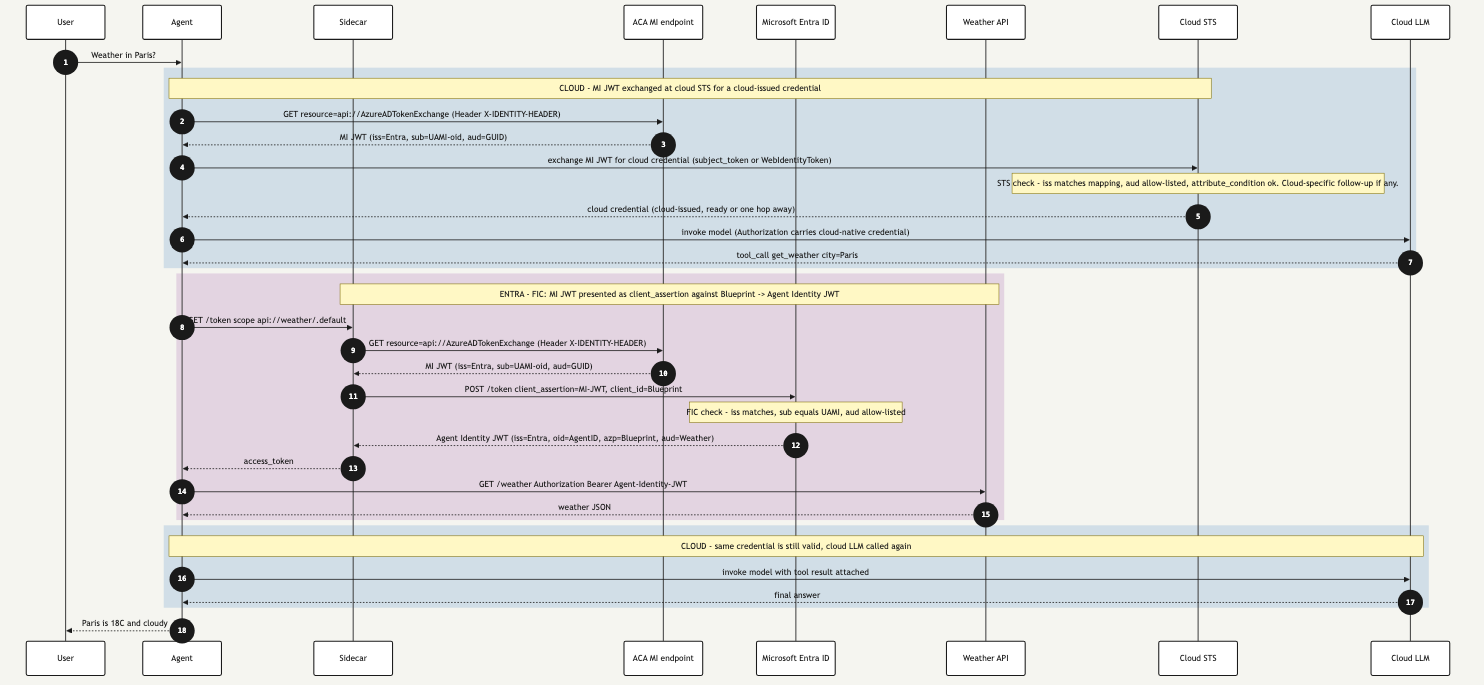
Figure 4. Federated request flow. Both bands start from the same managed-identity JWT (steps 2 and 9). Each runs a different federation exchange. The blue band lands at a cloud-issued credential, the purple band lands at an Entra-issued Agent Identity JWT.
Where to find the cloud-specific version. The diagram above keeps the cloud-LLM band generic on purpose. The exact federation call shape on the blue band (including the GCP impersonation hop and the AWS intermediary-app step) is different per cloud and is planned for the dedicated GCP and AWS articles later in the series.
Reading the diagram
Each colored band is one issuer being authenticated to via one federation exchange. The interesting objects are the JWTs: the MI JWT that both bands start from, and the federation that turns it into something the downstream issuer will accept. The tables below walk the flow from the user’s prompt to the final answer.
Step-by-step
| Steps | Band | What happens |
|---|---|---|
| 1 | — | User asks the agent for the weather in Paris. |
| 2 | 🟦 Blue | Agent calls the ACA managed-identity endpoint ($IDENTITY_ENDPOINT with X-IDENTITY-HEADER). No file on disk, the platform proves the caller. |
| 3 | 🟦 Blue | Endpoint returns the MI JWT signed by Entra, with iss = Entra v2, sub = UAMI object id, aud = api://AzureADTokenExchange (emitted on the wire as a GUID). |
| 4 | 🟦 Blue | Cloud federation exchange. Agent posts the MI JWT to the cloud’s STS as subject_token (GCP) or WebIdentityToken (AWS). STS checks iss, aud, and the attribute condition. |
| 5 | 🟦 Blue | STS returns a cloud-issued credential (ready to use, or one impersonation hop away). |
| 6 | 🟦 Blue | Agent calls the cloud LLM with the cloud-native authorization header. |
| 7 | 🟦 Blue | LLM responds with a tool_call get_weather city=Paris. |
| 8 | 🟪 Purple | Agent asks the sidecar for a token scoped to the Weather API. |
| 9 | 🟪 Purple | Sidecar calls the same ACA managed-identity endpoint, from a different container. |
| 10 | 🟪 Purple | Endpoint returns the MI JWT (structurally identical to step 3). |
| 11 | 🟪 Purple | FIC exchange. Sidecar posts client_assertion=<MI JWT> and client_id=<Blueprint> to Entra. Entra runs the FIC check (iss matches, sub equals UAMI, aud allow-listed). |
| 12 | 🟪 Purple | Entra returns the Agent Identity JWT (oid = Agent Identity, azp = Blueprint, aud = Weather API). |
| 13 | 🟪 Purple | Sidecar hands the JWT to the agent. |
| 14 | 🟪 Purple | Agent calls the Weather API with Authorization: Bearer <Agent-Identity-JWT>. |
| 15 | 🟪 Purple | Weather API returns the JSON. |
| 16 | 🟦 Blue | Agent reuses the cloud credential from step 5 (still inside its lifetime) and calls the cloud LLM again with the tool result attached. No new credentials minted. |
| 17 | 🟦 Blue | LLM returns the final answer. |
| 18 | — | Agent delivers the answer to the user. |
Per-band summary
| Band | Input JWT | Federation | JWT or envelope validated downstream | Authenticated party at the API |
|---|---|---|---|---|
| 🟦 Blue, cloud LLM path (steps 2–7, 16–17) | MI JWT from the ACA managed-identity endpoint | Cloud federation (GCP WIF or AWS OIDC provider + role) | Cloud-issued bearer token or web-identity-derived envelope | Cloud-side principal (service account or IAM role) the federation binds to |
| 🟪 Purple, Entra and Weather path (steps 8–15) | MI JWT from the ACA managed-identity endpoint (same shape as step 3) | FIC on the Blueprint, MI JWT presented as client_assertion | Agent Identity JWT (oid = Agent Identity, azp = Blueprint, aud = Weather API) | Agent Identity, on behalf of the Blueprint |
Putting it together
The MI calls in the two bands (steps 2 and 9) are the same input JWT showing up twice, once per band. The federation checks the two bands run (cloud STS validating the MI JWT, Entra validating the MI JWT for FIC) are the same shape of gate running on two different issuers. One MI JWT fans out into two federation exchanges. The cloud-side federation lands at a cloud-issued credential. FIC lands at an Entra-issued Agent Identity JWT. Two completely different downstream identities, both proven by the same input JWT.
Four downstream calls. Two federation exchanges. Zero credentials on the container’s filesystem.
Note. Fan-out and fan-in
The MI JWT fans out twice. Once into the Entra federation for the Weather API. Once into the cloud federation for the cloud LLM. The two responses fan back in at the agent process, which uses them on two different downstream calls. The fan-out point is the managed-identity endpoint. The fan-in point is the agent’s request loop. Everything between those two points is two parallel federations sharing a trust anchor.
Federated pattern failure modes (Entra side)
The higher environment has a sharper failure surface than the lower environment. Most issues are configuration drift between three places: the ACA revision, the cloud-side federation contract, and the Blueprint’s FIC. The four rows below cover the Entra-side failures you will see regardless of cloud. Cloud-specific rows (AWS InvalidIdentityToken, GCP subject not allowed, intermediary-app refresh failures) belong in the cloud-specific articles planned for later in the series.
| # | Symptom | Most likely cause | Where to look first |
|---|---|---|---|
| 1 | Sidecar fails with AADSTS70021: No matching federated identity record found | FIC subject does not match the UAMI’s oid, or the FIC is missing entirely | az ad app federated-credential list --id <Blueprint> |
| 2 | Sidecar fails with AADSTS700016: Application … not found in the directory | Sidecar’s AZURE_CLIENT_ID env var still points at a deleted dev app | ACA env vars on the sidecar container |
| 3 | All managed-identity token requests hang for ~10s then time out | UAMI is not attached to the ACA revision, a SAMI is being used by mistake, or the IDENTITY_ENDPOINT env var is missing in the container | az containerapp show -g <rg> -n <app> --query identity and env | grep IDENTITY_ inside the container |
| 4 | Sidecar gets AADSTS650053, requested scope does not exist | Weather API scope not exposed on the API’s app registration, or the Blueprint never had it admin-consented | setup-obo-client-app.sh re-run against the production Blueprint |
Caution. Failure mode #3 is the higher-environment analogue of “your laptop cannot do the federated pattern.” When the managed-identity endpoint is not reachable, the entire chain starves. Always confirm the UAMI is attached to the revision. Confirm the agent container is using the right
client_id. ACA revisions can carry multiple UAMIs, and the SDK needs the one you mean.
Tip. Decode every JWT at least once. The Microsoft
jwt.mstool is your friend. The first time you seeaudas a GUID instead of the URI you typed, the rest of this article’s failure-mode table will make immediate sense.
Up next
Entra Agent ID Across Clouds: Part 3, Managed Identity and Entra Objects opens up the Entra side of the picture. Part 2 mentioned the Blueprint, the Agent Identity, the FIC, and the UAMI as if they were obvious objects. They are not. Part 3 walks each one as a first-class object, with the portal screens, the CLI calls, the schemas, and the directory roles each one needs.
For new posts in this series, subscribe via the RSS feed or follow along on LinkedIn.
Read next
- Digital Identity
Entra Agent ID Across Clouds: Part 5, Anti-Patterns
Final article in the five-part series on running Microsoft Entra Agent ID against third-party clouds. Closes the loop with the variants and failure modes that consume the same operational budget as the federated pattern without delivering its security properties, and ends with the takeaways worth pinning to the team wiki.
- Digital Identity
Entra Agent ID Across Clouds: Part 4, FIC, Cross-Tenant, and OBO
Fourth article in the five-part series on running Microsoft Entra Agent ID against third-party clouds. Opens up the Federated Identity Credential as a first-class object: single-tenant, cross-tenant SaaS shape, and the orthogonal world of on-behalf-of (OBO) where the agent acts for a signed-in user.
- Digital Identity
Entra Agent ID Across Clouds: Part 3, Managed Identity and Entra Objects
Third article in the five-part series on running Microsoft Entra Agent ID against third-party clouds. Pins down what the UAMI actually is in this architecture, why SAMI breaks federation, the three distinct Entra objects (UAMI, Blueprint, Agent Identity) and the three claims (sub, azp, oid) they each populate, and the production trade-off between federating the UAMI or the Agent Identity to the cloud.
Worth reading again?
Get the next one in your inbox.